.png)

Subscribe to newsletter
Subscribe to receive the latest blog posts to your inbox every week.

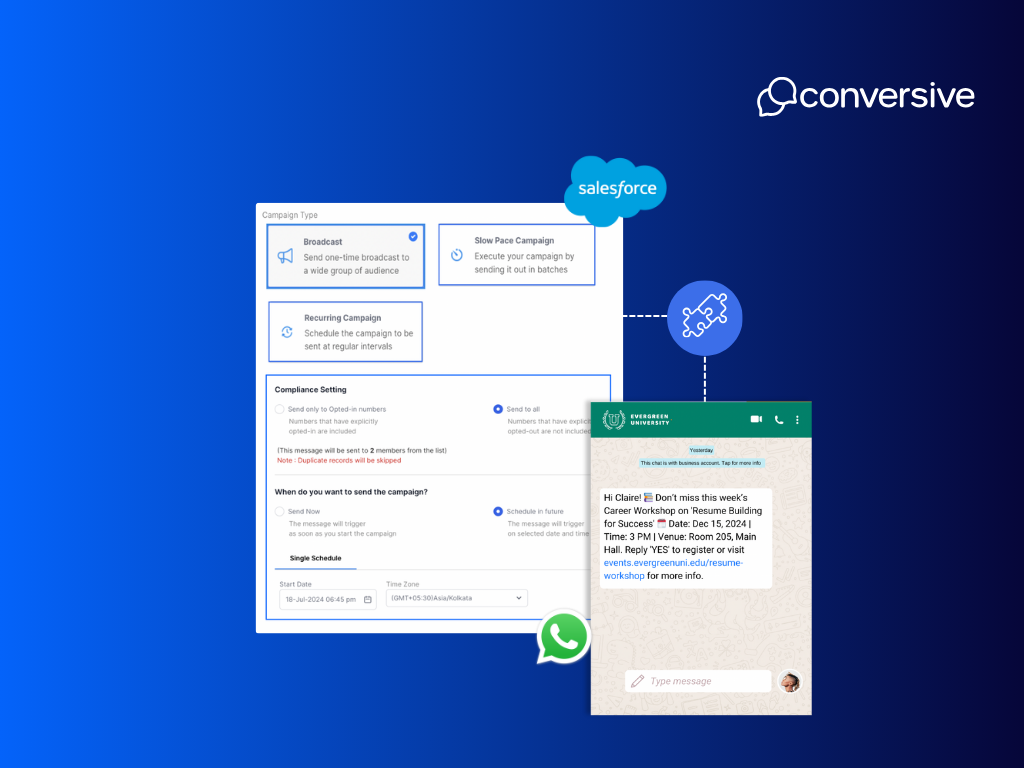
WhatsApp is the default communication channel for millions of customers for tasks like booking a doctor’s appointment, applying to a university, or tracking a loan application.
Its real-time, mobile-first experience is more likely to get opened and responded to than email or phone calls. But for businesses using Salesforce, messaging over WhatsApp in isolation misses the point: it must be embedded into CRM workflows to be effective.
When WhatsApp is integrated with Salesforce, every message gains context.
Teams can personalize replies, trigger automated updates, and maintain a full history of conversations on the CRM record. This turns WhatsApp from a reactive tool into a proactive engagement channel, one that’s trackable, compliant, and coordinated across teams.
There are 2 options available to integrate WhatsApp with Salesforce and start sending messages:-
Salesforce does support WhatsApp messaging natively but only through paid add-ons. Depending on your use case, you can choose between Digital Engagement for 1:1 conversations and Marketing Cloud’s WhatsApp module for campaign-style automation.
Both require integration with Meta’s WhatsApp Business API and additional configuration inside Salesforce.
Enables two-way WhatsApp conversations within the Service Console. Best for support agents managing case-based communication, it supports message routing, agent assignments, and basic automation via Flows.
Allows teams to send outbound, template-based WhatsApp messages as part of automated journeys in Journey Builder. Ideal for promotions, reminders, or transactional updates but disconnected from the core CRM interface used by sales or support teams.
Follow these steps for native WhatsApp integration with Salesforce:-
Begin by creating or linking your WABA through Meta Business Manager. This is required to use any official WhatsApp API integration.
In Salesforce Setup, go to Messaging Settings → select New Channel → choose WhatsApp. Follow the on-screen prompts to begin the channel configuration.
Connect Salesforce to Meta by logging in with your business credentials. You’ll need to complete business verification and phone number registration as part of WhatsApp API onboarding.
For Service Cloud, use Omni-Channel to route incoming WhatsApp messages to available agents. Set up automation using Salesforce Flows to send or respond based on case events or keywords.
For Marketing Cloud, configure templates in Mobile Studio, then deploy them through Journey Builder with audience and trigger settings.
Note: These capabilities require additional Salesforce licensing, either Digital Engagement or Marketing Cloud Enterprise Edition, and involve significant setup time, especially for regulated workflows.
While Salesforce’s native WhatsApp solutions offer useful capabilities, they’re often confined to specific clouds or require switching between interfaces. Conversive solves this by embedding WhatsApp messaging natively across Salesforce Sales, Service, and Marketing Clouds without the need for external APIs, connectors, or complex configurations.
Conversive transforms WhatsApp from a standalone channel into a fully orchestrated, compliant, and CRM-aware messaging experience. Every conversation is linked directly to the corresponding Lead, Contact, Opportunity, or Case. Whether triggered manually by a user or automatically by CRM events, WhatsApp messages are contextual, traceable, and governed by built-in compliance protocols.
With Conversive, WhatsApp becomes more than a messaging tool; it becomes a compliant engagement layer tied directly into your Salesforce data model and workflows:-
Conversive installs directly into your Salesforce org and works across all clouds. No third-party platforms or custom APIs required.
Send and receive WhatsApp messages from within CRM records using Converse Desk or Inbox, with full message history retained and visible.
Use the Converse App to create automated WhatsApp journeys triggered by Salesforce Flows, Process Builder, or CRM field changes without needing developer support.
Access and customize Meta-approved message templates (HSMs) for use cases like appointment reminders, lead follow-ups, or document requests.
Manage WhatsApp, SMS, RCS, and Voice interactions from a single interface helping teams switch channels without switching tools.
Track opt-ins and opt-outs at the record level, maintain audit logs, and ensure every message aligns with TCPA, HIPAA, GDPR, and 10DLC requirements.
View delivery rates, response times, and engagement metrics from within Salesforce dashboards allowing continuous optimization of messaging campaigns.
Every conversation stays tied to the Salesforce record, making it easy for agents, advisors, or enrollment teams to pick up where the last message left off.
Conversive helps businesses move beyond fragmented messaging tools turning WhatsApp into a compliant, CRM-powered engagement channel that scales across departments.
Unlike traditional WhatsApp integrations that rely on external platforms or developer-heavy configurations, Conversive is built natively for Salesforce making setup fast, centralized, and accessible to non-technical teams. Within minutes, teams can start sending compliant, CRM-linked WhatsApp messages directly from Lead, Contact, or Case records.
Here’s how to get started:
Begin by locating and installing the Conversive app from the AppExchange. This gives you access to Converse Desk, Converse App, Inbox, and all messaging modules including WhatsApp.
Conversive guides you through the process of registering your WABA using Meta Business Manager. This includes connecting your business profile, verifying your company, and linking phone numbers for use with WhatsApp.
Use Salesforce Setup or Conversive’s admin panel to activate WhatsApp on standard objects like Leads, Contacts, and Cases. Add Converse Inbox or Desk to the page layouts where users will engage in messaging.
Upload or select Meta-approved message templates for your region. Define opt-in rules, auto-responses, and keyword triggers. Conversive tracks all consent interactions automatically, ensuring full compliance.
Use the no-code Converse App to build workflows that trigger WhatsApp messages based on CRM activity such as new inquiries, missed calls, or status changes. These journeys can include if/else logic, time delays, and multi-channel paths.
From Converse Desk, agents can handle inbound WhatsApp messages in real time with full visibility into past interactions. Use built-in dashboards to track delivery rates, engagement, and opt-out trends.
Salesforce offers WhatsApp capabilities through Digital Engagement and Marketing Cloud but they come with trade-offs. These tools often operate in separate silos, are restricted to certain teams (like support or marketing), and can be costly to deploy and maintain. For organizations needing messaging to work across departments, with automation and compliance built in, Conversive fills the gap.
The table below compares the core features, setup requirements, and CRM alignment between Salesforce’s native options and Conversive:-
Conversive stands out by delivering a unified messaging experience inside Salesforce without requiring teams to toggle between platforms or stitch together workflows. Whether you're aiming for compliant communication in regulated sectors or just want cleaner automation across channels, Conversive brings everything into one CRM-native workspace.
Choosing between Salesforce’s native tools and Conversive comes down to how deeply you want WhatsApp integrated into your CRM, and how critical compliance, automation, and scalability are to your organization.
Salesforce’s native integrations work well for narrow use cases, like support tickets or outbound campaigns. But for teams that operate across functions and industries where every message matters, Conversive offers the flexibility and control those tools often lack.
Use Conversive if you:
Conversive isn’t just about sending WhatsApp messages, it’s about building compliant, contextual, and scalable conversations that live inside your CRM. Book a demo to explore use cases tailored to your industry, team, and compliance needs.
Yes. But only through paid add-ons like Digital Engagement (for 1:1 support messaging) or Marketing Cloud (for campaign automation). These tools require setup through Meta Business Manager and may not integrate seamlessly across all Salesforce Clouds.
Yes. With Marketing Cloud, you can automate via Journey Builder. With Conversive, you can build automated WhatsApp journeys using the Converse App, Salesforce Flows, or Process Builder without writing code.
Conversive tracks every opt-in and opt-out at the record level, maintains audit logs, and supports key regulatory frameworks like TCPA, HIPAA, and GDPR. It also manages WhatsApp template approvals and consent workflows within Salesforce.
Yes. Conversive supports multi-channel messaging (WhatsApp, SMS, Voice, RCS) from a unified inbox within Salesforce. Conversations are tied to CRM records, giving teams complete visibility across channels and history.


Subscribe to receive the latest blog posts to your inbox every week.

We respond with 10 support messages to every support email – our customers love it.

Greg Royse
CEO, Tidy

“We were missing 58% of incoming calls. Now we answer 80% + of all incoming enquiries.”

Ajaz Elahi
Director, Sinspeed

“This product is AMAZING and is changing my business. It reaches clients 100x better than email.”

Michael Goldenberg
President, DebtCare Canada

“Conversational Messaging capabilities of SMS-Magic are among the best in the industry and offers security and reliability for SMBs to Large Enterprise Customers.”

Stan Petit
API Senior Partner Sales Manager, Vonage

SMS-Magic is a simple, powerful, SMS solution for Salesforce that has become integral to our day-to-day operations.

Martin McCauley
Director of Patient Services, BioSpine Institute

“If our loan applicants did not receive timely SMS-Magic text messages, we wouldn’t be funding loans & we would lose customers.”

David Ross
Head of IT, Upstart

“Having full-context conversation history from SMS-Magic helps us understand what has been sent to the customer across different departments and if those messages have been opened.”

Camilla Mills
Marketing Campaigns Manager, DaySmart

We average a 59% response rate from clients to text message surveys.

Craig Garber
CFO, LifeMoves

.png)