.png)


Subscribe to newsletter
Subscribe to receive the latest blog posts to your inbox every week.

SMS is one of the most reliable ways to deliver timely information directly to customers. But in regulated industries where consent, auditability, and customer data protection are non-negotiable, sending bulk SMS requires additional compliances.
Before even a single message goes out, teams need to align multiple systems, verify opt-ins, and ensure messaging content complies with local and global regulations. This guide walks through that entire workflow, from preparing your contact list and securing the right approvals to sending messages at scale and tracking their performance.
Each step is structured for teams operating in compliance-heavy environments where every message must be traceable, accountable, and relevant.
This section outlines the critical checks to complete before launching a bulk SMS campaign, especially in regulated industries where missteps can lead to blocked messages or penalties.
Below is a practical checklist with supporting guidance for each item:
Every recipient must have clearly opted in to receive messages. Capture consent using web forms, SMS keywords (like “JOIN”), or CRM-integrated tools that log the time, date, and source of the opt-in.
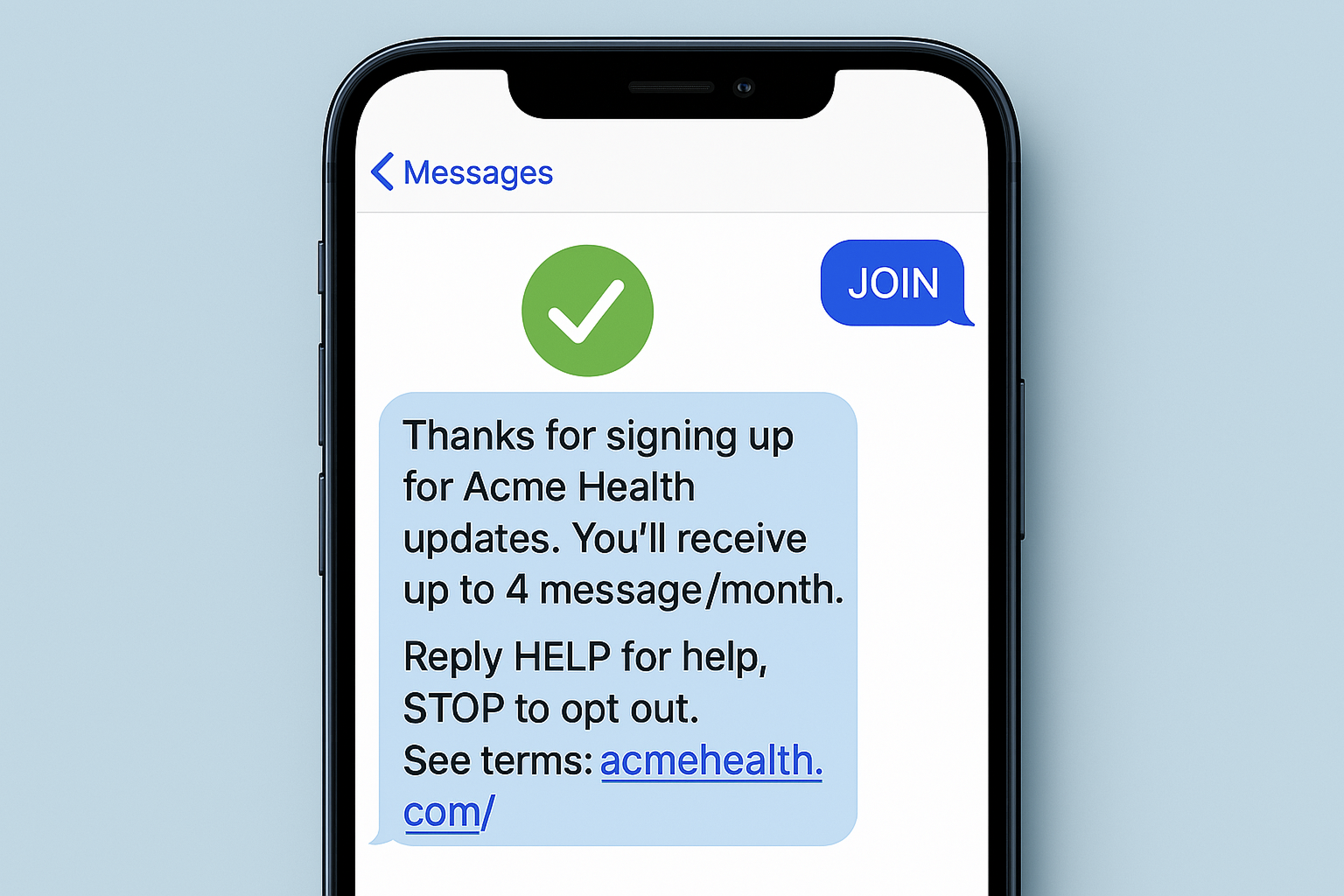
This ensures every message is traceable and defensible under regulations like TCPA, GDPR, or HIPAA.
If you’re sending messages from a dedicated number such as a long code or a brand-registered Sender ID, you’ll need to comply with the 10DLC (10-Digit Long Code) regulations in the U.S. This system, managed by mobile carriers, requires businesses to register both their use case and messaging content to reduce spam and ensure message deliverability.
Prepare a clean, deduplicated contact list in CSV or Excel format. Include key fields like mobile number, name, and any personalization tokens (e.g., appointment date). This reduces the risk of delivery errors and ensures proper message formatting.
Bulk messages should be short, specific, and clearly identify who’s sending them. Use placeholders like {First Name} to personalize each message, and avoid ambiguous language that could be flagged as spam.
Schedule your campaigns within local business hours to improve deliverability and user trust. Every message should include opt-out instructions (e.g., “Reply STOP to unsubscribe”) to stay compliant and respect recipient preferences.
Non-compliant SMS campaigns may be blocked or penalized - Ensure that every contact, message, and sending window is validated against applicable laws in your region.
Once your contact list, consent records, and message templates are in place, you're ready to launch your campaign. Conversive offers two ways to send bulk SMS, either through its standalone portal or directly within Salesforce.
Both options are designed for regulated businesses that need traceability, auditability, and real-time visibility.
For teams managing communication outside of Salesforce, the Conversive portal offers a full-featured interface for sending compliant, large-scale SMS campaigns.
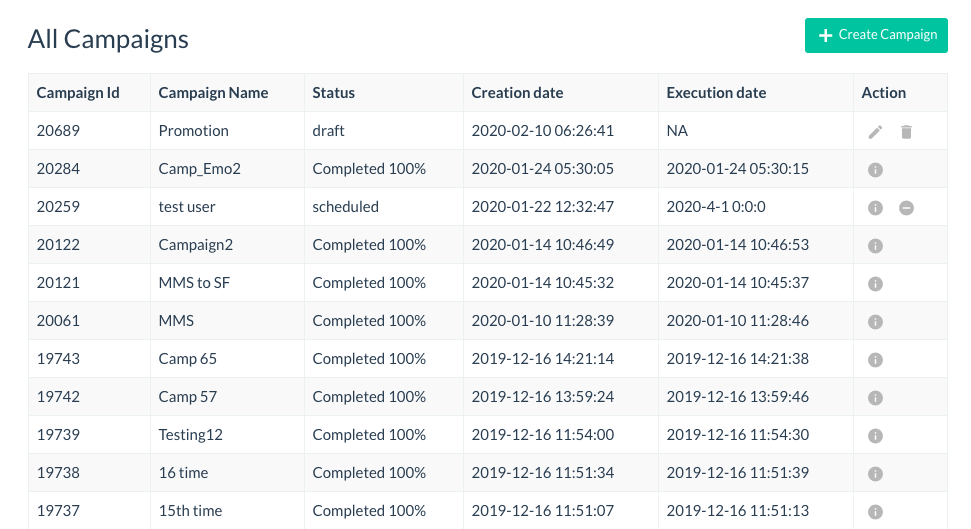
The workflow is structured to support message accuracy, auditability, and deliverability without needing custom code or external integrations.
Follow these steps to run a campaign:
Start with a clean and correctly formatted CSV file. At minimum, include mobile numbers in international format (e.g., +1 for U.S., +91 for India). You can also add columns like {First Name}, {Appointment Date}, or any other field you plan to use in message personalization. Double-check for missing values, duplicates, or non-numeric entries, as these may trigger validation errors during upload.
Log in to the Conversive portal and navigate to the “Bulk Messaging” tab. Click “Upload Contacts” and select your CSV file. The platform will automatically validate the file’s structure by checking for required fields, formatting errors, and invalid numbers. If issues are detected, Conversive provides a line-by-line report so you can correct and re-upload with confidence.
Once your contacts are uploaded, you’ll be prompted to choose a message. You can either select an approved template from your library or create a new one directly within the portal. Add personalization tokens like {First Name} by referencing column headers from your CSV file. Keep the message concise, identify your business clearly, and ensure opt-out instructions are included.
Conversive allows you to either send messages instantly or schedule them for a later date and time. If your audience spans multiple time zones or operates under regulated contact hours (e.g., 9am–8pm local time), use the scheduling feature to optimize delivery. The system will only send during approved hours configured in your account settings.
Before launching to your full list, use the “Send Test” option to deliver a preview to your own number. This helps verify how personalization fields render, and whether the tone and structure feel appropriate. It also confirms that sender ID, opt-out text, and spacing appear as expected across different mobile devices.
After your campaign is live, navigate to the “Responses” dashboard to track real-time performance. You’ll see metrics such as total sent, delivery confirmations, opt-outs, and replies. You can also filter responses by status or flag any messages requiring follow-up. All interactions are logged automatically for compliance review.
Conversive automatically tracks delivery status, timestamps, sender IDs, opt-out events, and response histories providing a full compliance record for every campaign.
For teams that work primarily within Salesforce, Conversive enables bulk SMS campaigns without ever leaving the CRM. This approach ensures your messaging is fully integrated into lead, contact, or campaign workflows with consent, history, and status updates logged automatically at the record level.
Here’s how to run a bulk SMS campaign from Salesforce using Conversive:
Start by navigating to the object where your target audience is stored. This could be a Lead list view, a filtered group of Contacts, or an active Campaign.
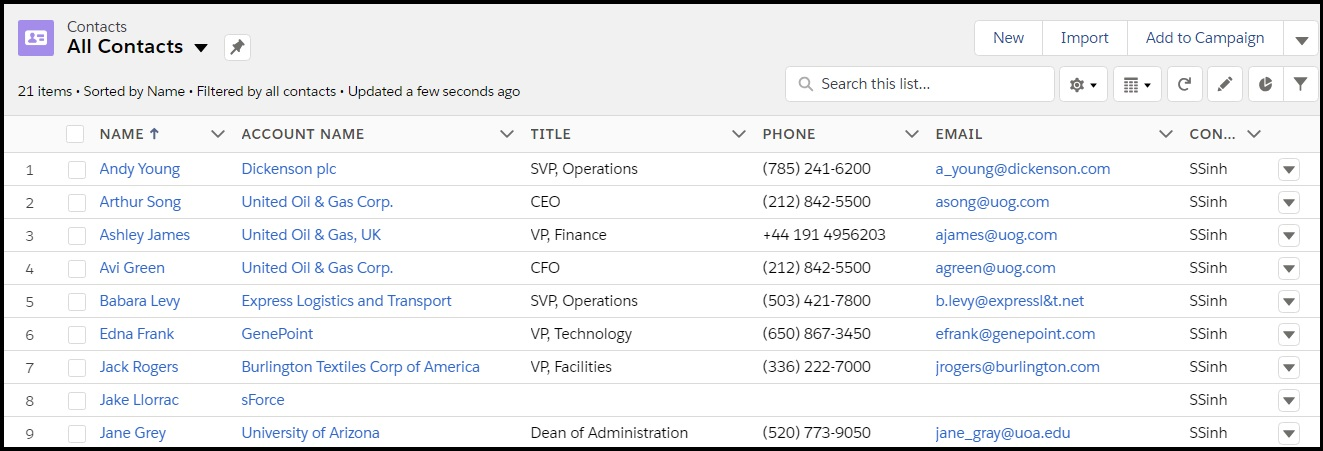
Use Salesforce’s multi-select tools to choose the specific records you want to message. Make sure each record has a valid mobile number and opt-in status before proceeding.
With your records selected, click the Conversive action button labeled “Send Bulk SMS.” This opens a message composition window powered by Conversive’s messaging engine directly within Salesforce.
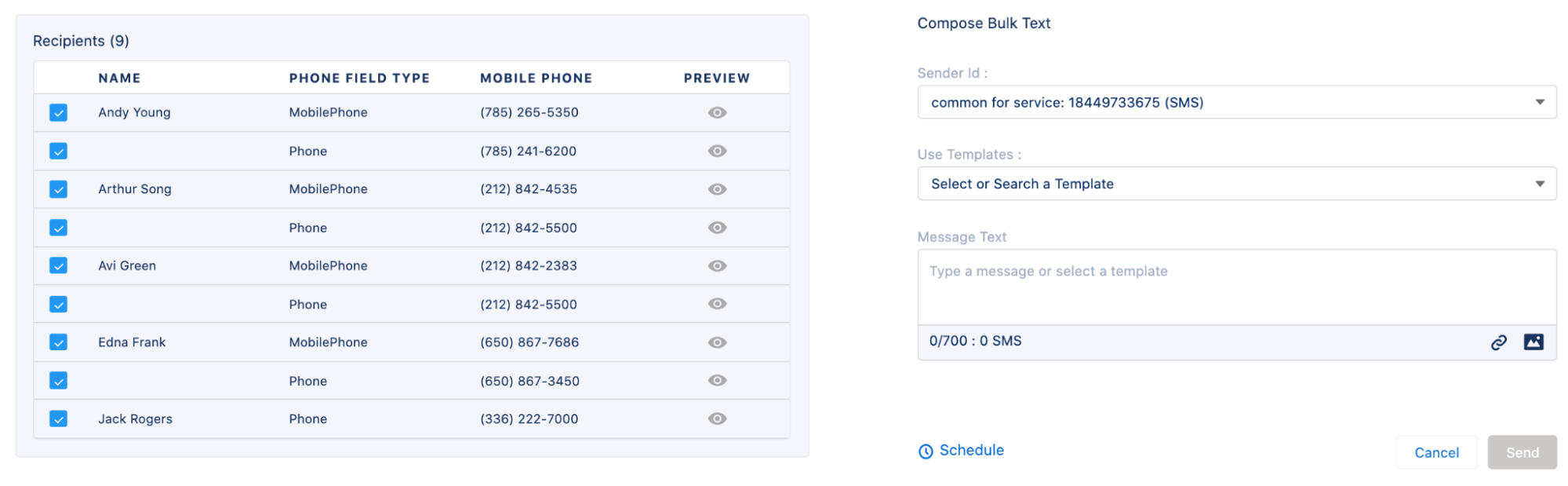
The interface automatically references available sender IDs, templates, and tokens based on your account configuration.
Pick the approved Sender ID from the dropdown list. This determines how your message will appear on recipients’ phones. Then either write a new message or select a template that’s pre-approved for your use case. The template engine supports personalization using Salesforce fields like {FirstName}, {AppointmentDate}, or custom fields relevant to your process.
You can dispatch the message immediately or schedule it for a later time. For regulated businesses, it's best to align your send time with local contact hours or operational guidelines. Conversive respects these guardrails and won’t deliver messages outside approved windows, even if they’re accidentally scheduled for off-hours.
Once sent, each message is logged inside the associated Lead, Contact, or Campaign record. This includes delivery confirmations, timestamps, and any replies. Agents and managers can view the full conversation thread, monitor opt-outs, and follow up without needing to switch systems.
All SMS interactions sent via Conversive in Salesforce are audit-logged automatically ensuring that your team remains compliant with consent rules and communication policies at all times.
Most bulk SMS platforms can send messages at scale but few are built to manage the operational, compliance, and CRM challenges faced by regulated industries. Conversive is purpose-built for teams that need more than delivery receipts. It combines consent management, native CRM integration, and multi-channel capabilities in one unified platform.
Here’s why businesses in healthcare, finance, education, and law consistently choose Conversive:
Conversive enforces consent rules at the system level. Opt-in records, opt-out keywords, and Sender ID registrations (including 10DLC and DLT) are all managed inside the platform reducing risk and simplifying compliance.
Teams don’t have to worry about sending messages after hours or to unsubscribed contacts. Conversive automatically restricts delivery to approved time windows and filters out records that lack valid opt-in.
Whether a lead updates their application status or a case is escalated, Conversive can trigger messages based on real-time changes in Salesforce. This ensures communication is contextual, not just scheduled.
When automated conversations reach their limit, Conversive enables seamless handoff to a live agent along with full conversation history and CRM context. Customers never have to repeat themselves.
Conversive is designed to improve measurable outcomes across high-consideration workflows reducing missed engagements, increasing response rates, and simplifying compliance at scale. For teams in legal, healthcare, education, and finance, this translates into fewer manual tasks, more timely follow-ups, and better alignment between customer communication and internal systems.
By combining CRM data with structured messaging workflows, Conversive helps teams move faster without compromising regulatory standards.
Appointment reminders, deadline alerts, and registration nudges are sent automatically improving customer follow-through and reducing friction in long decision cycles.
CRM-triggered messages reach customers when context is fresh prompting quicker replies and keeping conversations active.
Every message is sent under governed rules, with opt-in verification, audit trails, and time-of-day restrictions enforced in the background.
Agents and staff can monitor responses, filter inquiries, and prioritize action items from one interface without switching tools or rechecking consent.
Schedule a demo to improve your customer engagement with compliant SMS.
You need a documented opt-in from every recipient. This consent should include the time, date, and method of capture whether via web form, keyword response, or CRM-based checkbox. Regulations like TCPA, GDPR, and HIPAA require that this information be stored and auditable.
Conversive automatically manages opt-out keywords (like “STOP”) and updates contact status in real time. It also logs every consent event including opt-ins, opt-outs, and sender ID preferences ensuring your messages are always aligned with regulatory requirements.
Yes. Conversive supports dynamic fields like {First Name}, {Appointment Date}, and custom CRM variables. These are automatically populated per recipient during message generation, allowing for tailored communication at scale.
Conversive is built for industries that need more than delivery. It provides consent governance, CRM integration, compliance enforcement, and audit-ready logs. It supports multi-channel messaging and human handoff, making it suitable for healthcare, law, education, and finance.
Yes. Conversive tracks delivery status, opt-outs, replies, and overall campaign performance in real time. All data is visible within your CRM or the Conversive portal, depending on where the campaign was launched.


Subscribe to receive the latest blog posts to your inbox every week.

We respond with 10 support messages to every support email – our customers love it.

Greg Royse
CEO, Tidy

“We were missing 58% of incoming calls. Now we answer 80% + of all incoming enquiries.”

Ajaz Elahi
Director, Sinspeed

“This product is AMAZING and is changing my business. It reaches clients 100x better than email.”

Michael Goldenberg
President, DebtCare Canada

“Conversational Messaging capabilities of SMS-Magic are among the best in the industry and offers security and reliability for SMBs to Large Enterprise Customers.”

Stan Petit
API Senior Partner Sales Manager, Vonage

SMS-Magic is a simple, powerful, SMS solution for Salesforce that has become integral to our day-to-day operations.

Martin McCauley
Director of Patient Services, BioSpine Institute

“If our loan applicants did not receive timely SMS-Magic text messages, we wouldn’t be funding loans & we would lose customers.”

David Ross
Head of IT, Upstart

“Having full-context conversation history from SMS-Magic helps us understand what has been sent to the customer across different departments and if those messages have been opened.”

Camilla Mills
Marketing Campaigns Manager, DaySmart

We average a 59% response rate from clients to text message surveys.

Craig Garber
CFO, LifeMoves

.png)