.png)

Subscribe to newsletter
Subscribe to receive the latest blog posts to your inbox every week.

.jpeg)
Customer expectations have clearly shifted in the last 3-4 years. While reaching out to their healthcare provider, legal advisor, or a university admissions office, people expect fast, informed, and seamless interactions. For service-heavy industries, this has made CRM-integrated communication tools essential.
Voice, text, and chat must now work in harmony within the systems teams already use. The pressure is on to respond quickly, personalize efficiently, and remain fully compliant across channels.
By connecting voice calls directly with CRM data, CTI streamlines how service agents and sales teams engage with customers. It automates call logging, surfaces context, and enables click-to-dial and screen pop.
This guide walks through how to set up CTI within Salesforce that reduces response times, cuts operational inefficiencies, and improves customer satisfaction.
So, let’s jump right into it:-
Computer Telephony Integration (CTI) connects your phone system directly with your CRM, allowing teams to manage calls and customer data in one place. Instead of toggling between systems or manually entering call notes, agents can view, log, and respond inside the CRM interface.
This simplifies workflows, improves accuracy, and speeds up every interaction.
CTI is especially valuable in customer service and sales environments, where context and response time directly impact outcomes.
Here are some of the key features that make CTI essential in modern CRM workflows:
Imagine a healthcare support team using CTI inside Salesforce. When a patient calls, the system routes the call to their assigned care coordinator. The agent sees the patient’s appointment history and prescription notes the moment the call comes in, enabling a faster, more personalized conversation without needing to ask repetitive questions.
Salesforce's CTI framework is designed to bring telephony and CRM workflows into a single, streamlined interface. Known as Open CTI, this framework allows third-party tools and native solutions to deeply embed calling features directly into Salesforce.
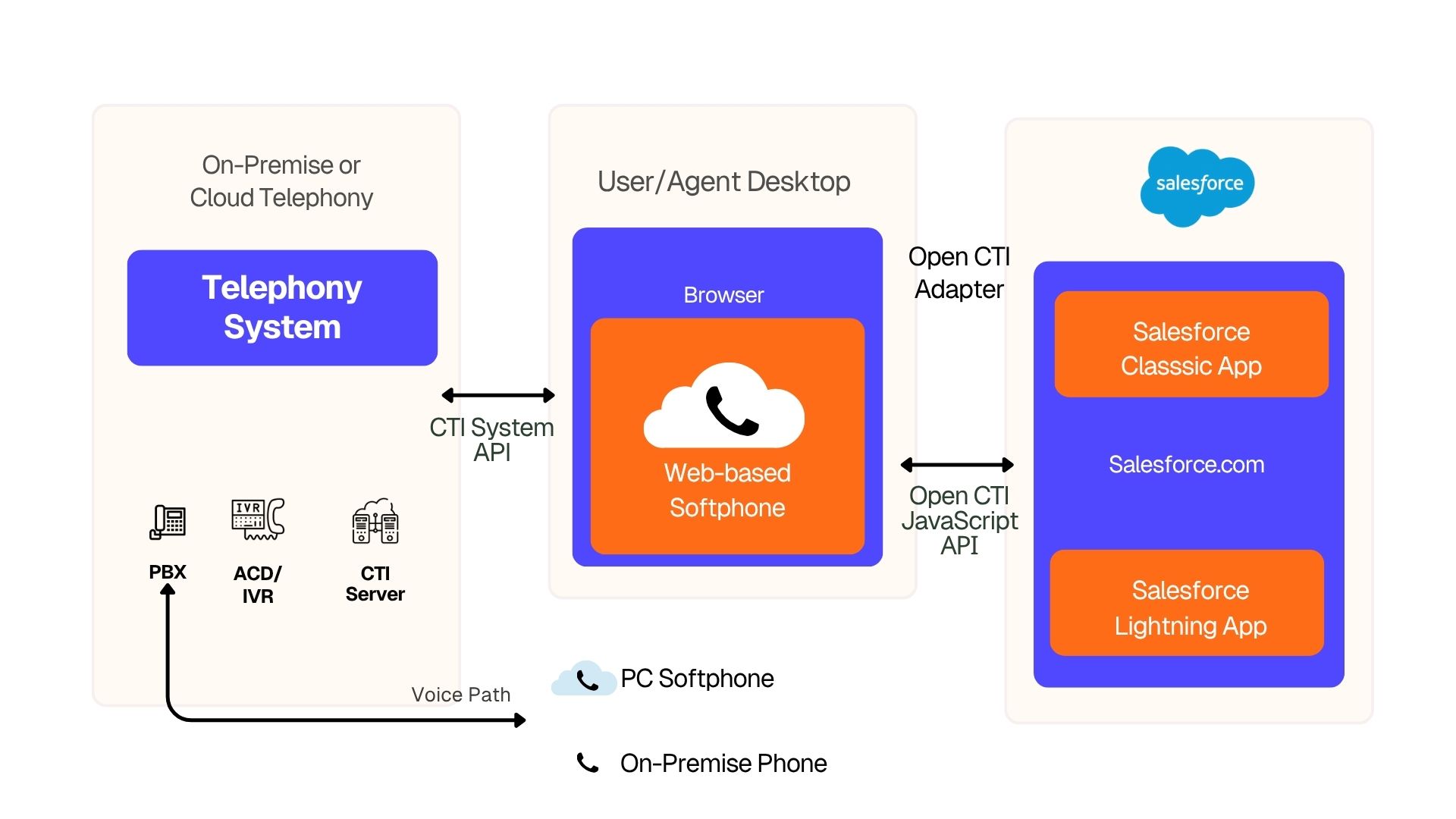
With CTI embedded in Salesforce, productivity and response quality both improve. Agents don’t waste time switching tabs, re-entering data, or searching for context as can handle inbound and outbound calls, log details, and trigger next steps without ever leaving the record they’re working on. Plus, managers benefit from real-time visibility into call metrics, agent activity, and customer engagement patterns.
Salesforce CTI typically includes the following core capabilities:
Follow these steps to setup CTI in Salesforce using Conversive:-

Install SMS Magic & Conversive app from Salesforce AppExchange for your org and assign the required licenses and permissions to users who need messaging access. This unlocks SMS, WhatsApp, and automation features within Salesforce.
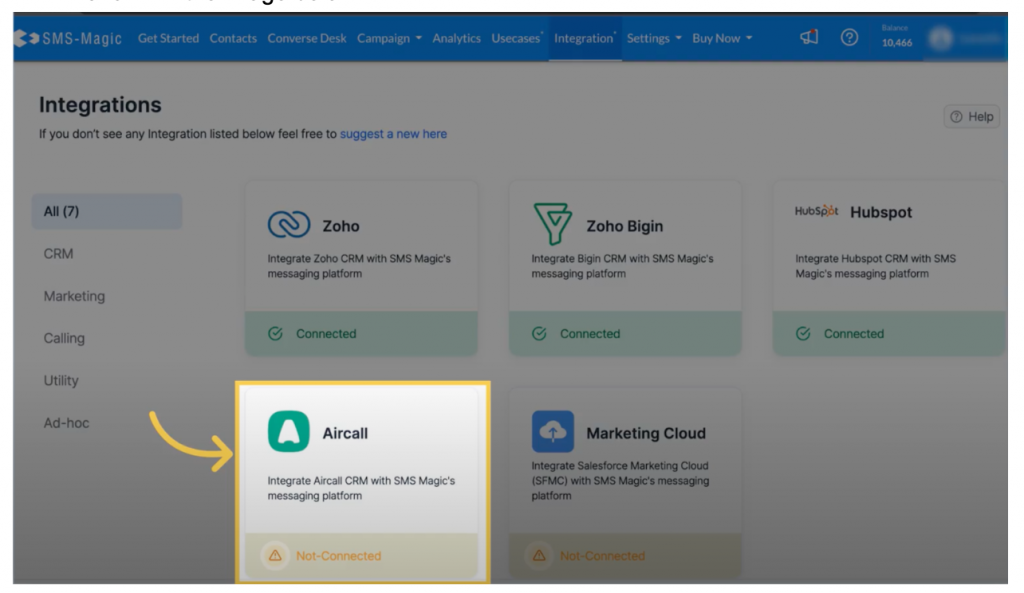
Also on AppExchange, search for and install the Aircall CTI package. This will embed Aircall’s softphone directly inside Salesforce, enabling real-time features like screen pop, call logging, and agent status tracking.
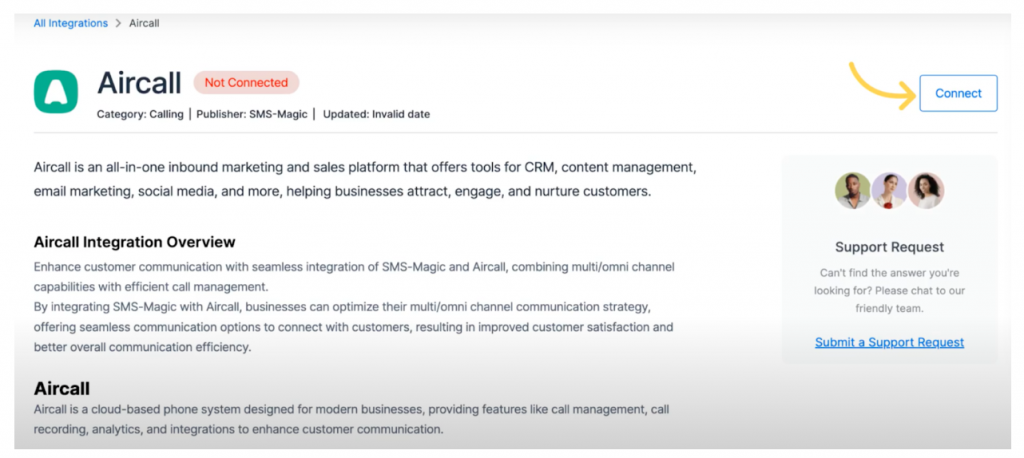
From your SMS Magic dashboard, navigate to the Aircall Integration Settings. Use OAuth authentication or enter your Aircall API key to authorize the connection. This syncs both platforms, enabling linked contact data and unified activity tracking across voice and messaging.
.jpeg)
Once connected, SMS Magic will list your Aircall phone numbers. Select the numbers you want to use for SMS or WhatsApp campaigns. These numbers will act as unified Sender IDs across voice and text channels, allowing smoother customer journeys.
.jpeg)
If you need to enable or modify messaging capabilities on specific Aircall numbers, contact your Aircall Customer Success Manager. Some number configurations (like SMS-enabled numbers) require direct support to be made compatible with SMS Magic’s messaging platform.
In Salesforce Setup, go to Call Centers and add the Aircall softphone utility to your app pages or utility bar. Assign users to the Aircall Call Center profile, ensuring they have access to the voice dialer and can manage calls from within record pages.
Use test leads or contacts to simulate real use cases.
Use SMS Magic’s Admin Console and Aircall’s Dashboard to track integration status, number usage, and error logs. Access detailed documentation in the SMS Magic with Aircall Knowledge Hub for common troubleshooting scenarios, user management, and advanced use cases.
CTI is a game-changer for industries that rely on fast, accurate, and compliant communication. By combining telephony and messaging inside Salesforce, teams can respond faster, personalize more deeply, and reduce operational drag across the entire customer journey.
Here’s how it plays out in real-world environments:-
Admissions teams use CTI with Salesforce to immediately connect inquiries to the right counselor. When a prospective student calls or texts, the system shows their program of interest, stage in the application funnel, and previous interactions. Follow-ups are logged automatically, and reminders for interviews or document submissions can be triggered via SMS or WhatsApp.
Result: Teams see a 50% increase in inquiry conversion rates by reducing first-response delays.
Patient support teams can schedule, confirm, and follow up on appointments using integrated CTI and messaging. Calls are routed to the assigned care coordinator, and post-visit reminders can be automated through compliant SMS or voice drops. Every call is logged inside Salesforce Health Cloud for complete traceability.
Result: Clinics report up to 30% fewer no-shows and faster lab result follow-up times.
Law firms leverage CTI for intake and case management. Incoming client calls trigger a screen pop with their matter type, priority, and documentation status. Agents can follow up using templated reminders for court dates, document uploads, or payment links while staying TCPA-compliant.
Result: Reduced intake gaps and improved client satisfaction through faster, contextual responses.
Loan officers use CTI workflows to follow up with applicants on verification documents or next steps. With messaging and calling unified in Salesforce Financial Services Cloud, every conversation whether voice or text is linked to the same record.
Result: 3x faster loan processing by eliminating communication gaps across channels.
Many third-party tools offer limited integration, bolt-on workflows, or require additional infrastructure to work inside Salesforce. Conversive takes a different approach.
As a Salesforce-native platform, it embeds voice and messaging directly into CRM records, screens, and workflows ensuring a seamless, no-code experience for every user. It unifies CTI with messaging automation, journey orchestration, and full-stack compliance without leaving the Salesforce interface.
Key advantages of Conversive CTI:
Build triggered messaging and call flows with point-and-click logic using the Converse App. No developer required.
Every call, message, and consent action is logged in Salesforce, ensuring traceability and regulatory alignment.
Whether you’re managing student admissions or patient intake, Conversive includes pre-built journeys to speed up implementation.
Converse Desk allows agents to manage conversations across channels (SMS, WhatsApp, voice) in a single view boosting productivity up to 7x.
Opt-ins, opt-outs, and DNC enforcement are automated by channel, sender ID, and campaign, reducing legal exposure and improving deliverability.
Conversive ensures you stay fully compliant with privacy and regulatory requirements with built-in controls. Ready to experience what Salesforce-native CTI should feel like? Book a demo to see Conversive in action.
Integrating CTI with Salesforce allows your teams to handle calls, access customer data, and trigger follow-ups - all within one system. This reduces manual work, eliminates tab switching, and shortens response times. You also gain full visibility into call history and outcomes, enabling better tracking and smarter decision-making.
Yes. Conversive combines voice, SMS, and WhatsApp capabilities in a single Salesforce-native platform. Agents can initiate and manage both voice calls and messages from within Salesforce records, ensuring continuity across channels and improved agent efficiency.
Absolutely. Conversive includes built-in consent management and compliance tools that support TCPA, HIPAA, GDPR, and 10DLC standards. Every message and call interaction is logged with timestamps, opt-in status, and delivery metadata to maintain auditability.
Yes. The Converse App allows admins to configure region-specific workflows using a no-code interface. You can set different Sender IDs, call routing rules, and message templates based on geography, team function, or use case.
Conversive is often used to replace or consolidate multiple tools. It supports migration from third-party CPaaS and CTI vendors, especially when organizations need a unified solution that’s native to Salesforce and offers stronger compliance support.
Most teams complete the core CTI and messaging setup within 1–2 weeks. Conversive’s guided setup process, templates, and onboarding support make it easy to go live quickly without heavy technical lift or development work.


Subscribe to receive the latest blog posts to your inbox every week.

We respond with 10 support messages to every support email – our customers love it.

Greg Royse
CEO, Tidy

“We were missing 58% of incoming calls. Now we answer 80% + of all incoming enquiries.”

Ajaz Elahi
Director, Sinspeed

“This product is AMAZING and is changing my business. It reaches clients 100x better than email.”

Michael Goldenberg
President, DebtCare Canada

“Conversational Messaging capabilities of SMS-Magic are among the best in the industry and offers security and reliability for SMBs to Large Enterprise Customers.”

Stan Petit
API Senior Partner Sales Manager, Vonage

SMS-Magic is a simple, powerful, SMS solution for Salesforce that has become integral to our day-to-day operations.

Martin McCauley
Director of Patient Services, BioSpine Institute

“If our loan applicants did not receive timely SMS-Magic text messages, we wouldn’t be funding loans & we would lose customers.”

David Ross
Head of IT, Upstart

“Having full-context conversation history from SMS-Magic helps us understand what has been sent to the customer across different departments and if those messages have been opened.”

Camilla Mills
Marketing Campaigns Manager, DaySmart

We average a 59% response rate from clients to text message surveys.

Craig Garber
CFO, LifeMoves

.png)